

Overview
Arcabuds is a cute linear dungeon-crawler Unity game for PC/Xbox designed for couch coop with two players (but playable in singleplayer too). You play as one of two elemental buds, Pebbles (Earth) and Splashy (Water), as they progress through the level, using their unique abilities to fight through enemies and solve puzzles along the way.
The game was produced as part of our 3rd year university group project. The target audience is young children anywhere from the ages of 6 to 13.
Much of the game is designed around a second player taking control of the companion Splashy to encourage co-operative gameplay and friendship, being one of the core messages of the game. However, the game is fully playable in single-player as the lone player can swap between companions freely, much like the LEGO games, which we were greatly inspired by as a group.
Gameplay Video
My Role in the Project
Group Leader // Lead Designer // Level Design // Sound Director
This was the first group-based project where I took on a leadership role. I was the Lead Designer and de-facto Group Leader of the team. I handled most of the planning and scheduling that took place for each of the roles, delegating them to each individual person depending on workload through the teamwide MS Planner. I would also frequently check in with our group members on their progress, and lead the weekly meetings by discussing what has been done and what needs to be done in the future. I also ensured that our animator, artists, and programmers understood what needed to be done in terms of development.
As the leader I produced an Excel spreadsheet for a testing table, in order to keep track of any issues that may arise or what implementations have been tested or not. Each team member (including myself) was required to regularly test any work that they create or implement into the engine. I also produced the majority of a Tranzfuser pitch video using the DaVinci Resolve video editing software.
For the project, I researched into Unity's animation tree setup, and set up all of the animator controller trees, as well as custom animation layers and animation states for each animated model. I designed most of the boss move-sets and attack patterns as well, ensuring that they would be fun and challenging for the players while not providing too much difficulty for younger players. I also assisted the other designer in designing and producing the level, worked on producing prefabs for most of the reusable assets and interactables in the game, and created a sound effect masterlist in Excel for our sound designer and music composer, which proved to be very helpful in narrowing down the soundscape for the game.
Leadership Responsibilities
MS Planner & Scheduling
As both Lead Design and Group Lead, I had to not only narrow down on the creative vision of the game but also make sure everyone else was also on the same page. Early on in the project, we created an MS Planner which I would frequently update with any tasks that needed to be complete.

I would update this planner whenever we needed new tasks doing, and every week or two during our weekly meetings I would discuss with the team members whether we feel like we're on track or not and if we need to push things back or change things from our plan. This helped a lot to solidify what everyone needed to do - having the tasks written out clearly for every team member ensures that they know what they're supposed to be doing and reduces room for error significantly.
Weekly Meetings
As mentioned prior, every single week we would hold meetings through Discord where we would go over the current progress of the project, what needs to be done for the coming weeks, and any important information. As Group Lead I directed most of these meetings and made sure everyone in the group is on the same page about what needs to be done.
I also had to resolve a few conflicts and misunderstandings throughout my time in the group, teaching me the important skill of remaining neutral during conflict resolution.
Testing Table
I produced an Excel spreadsheet for alpha testing during development. This allowed us to keep track of any issues or bugs that might appear during development and resolve them as soon as we can. Each team member was encouraged to consistently test their work as they implement it into the engine, and I was no exception. I regularly tested the work I was doing on implementing the animation assets and assisting with level production.

Having to fill out the testing table encouraged team members to thoroughly be sure that their implementations worked well, whether it was the level design, scripting, or consistency of art assets. This greatly increased the quality of our work as a whole to a consistent degree.
Designer Responsibilities
Animation Controller setup
To set up the animations for each of the characters in game, I used Unity's animator controller system. I had to research this system entirely and learn how to use it for this project, as it was the first time I've ever used animator controllers and trees in Unity. Once I had a solid understanding of the basics, I worked closely with our animator to ensure that the animations were fitting for our game and would work well in-engine.

Pebbles' animator controller
Splashy's animator controller
As this was the first time I had used Unity's animator controller, the set-up is quite messy and has a couple of duplicate parameters, which I learned from later. It also only uses one layer for the majority of the animations. Originally, everything was on the same layer, but for Pebbles I later made a separate masked animation layer for the attacks. This layer only affected the bones that moved during the attack, meaning the chest and arms, meaning that Pebbles can both walk and attack at the same time pretty seamlessly. I also added his flinch animation in an additive layer, meaning it happens over the top of layers underneath it.

Pebbles AC - Attack animation layer. Designed to alternate in a one, two combo.
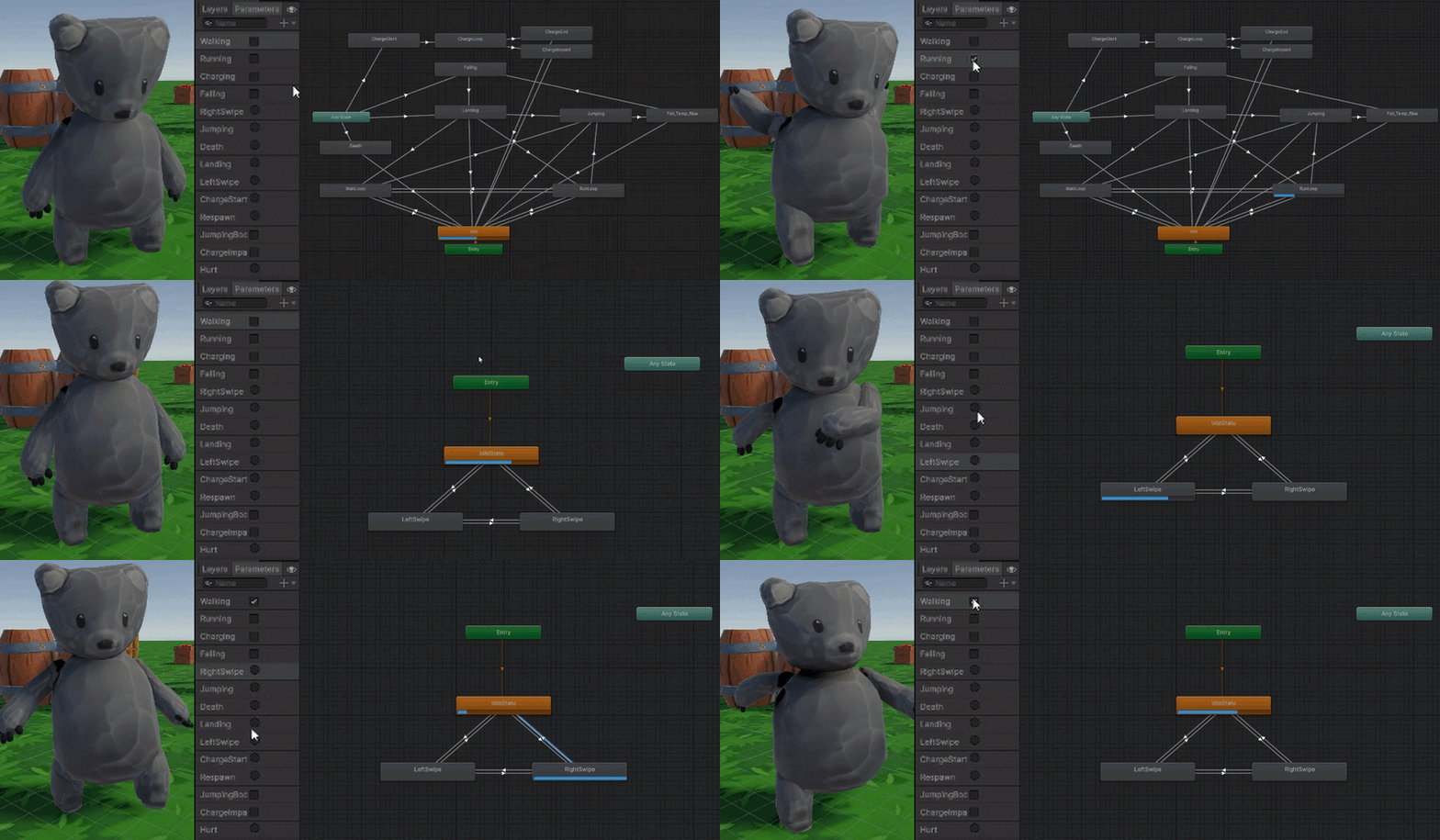
Showcase of Pebbles' masked attack animations on his Animator Controller
After implementing the animations for the protagonists, the next ones to be complete were the basic enemy. These enemies only used full-body sequence animations rather than any gestures that need to be additive or masked, so they only had one layer. A second layer was created regardless for death animations since otherwise having death come off of the Any State node in the same layer caused issues, though this second layer only has two nodes - empty and death.

Basic Enemy Animator Controller
Below you can see more of the animator controllers I implemented, including the basic boss and Zappy boss.

Basic Boss AC - Base Layer

Basic Boss AC - Ranged Layer

Zappy Boss AC - Movement Layer (Idle, and Stunned - Zappy flies so no need for walk)

Zappy Boss AC - Attack Layer
Level Design
To push our focus on friendship of this game, we wanted to allow the players to recruit another playable bud each time they beat a major boss, which would be attuned to one of the elements. Each area we were designing was tailor made for their bud and their element - the forest area has lots of breakable rocks which Pebbles (Earth) can slam through, and the water area has lots of bouncy lilypads that only Splashy (Water) can properly utilise.
Early on in the project, I assisted one of our other designers in coming up with various levels. I produced a rudimentary design of what an extended section of the Zappy level might look like. This section of the level never fully made it through to the final vertical slice, however, due to time constraints.

This early sketch was very messy but it served to get the point across. The stretch of the level I was designing was for the character Zappy, who represents the element of lightning.
This area would be "Thunderclap Forest", Zappy's elemental area tailor-made for him. As this was very early on in development, we weren't sure what exactly Zappy's ability would involve, except for the fact that we wanted it to be able to activate electrical objects (like a mechanical bridge, seen in the heart section on the right). We also knew from the start that Zappy is a bat and should be able to properly double jump, so I added parts where Zappy has to progress forward using his increased vertical and double-jump capabilities and then activate or complete something for the others to progress, again reinforcing the common message through the game of friendship triumphing adversity. Since they are journeying up a mountain, the verticality would be getting significantly harsher, so it makes sense that one of the buds would have some way of overcoming that.
Lightning would frequently randomly spike in areas during the level, defeating both players and enemies alike. On top of this, the green dots in the image would be Cloud NPCs that you rescue from miniature thunderstorms and as a reward, they would be able to pick up the players and take them over to a different section. After progressing through the level, the players would have to jump across floating rocks in the midst of a thunderstorm, and Zappy would need to use his double jump to leap across further than everyone in order to activate a bridge for the others. After this, the lightning storm would increase significantly as the player is forced to run full-speed-ahead to try and escape it up and around the heart pattern landmass, then jump up onto rocks again. They would reach the final stretch of the level where one last Cloud NPC is waiting to take them up to the final area, the volcano.
Level Production
Over the course of the project I consistently worked with our environment artist and our main level designer to assist in producing finalised levels. I would assist our level designer in populating the forest section with art assets as they were being produced, as well as use Unity's terrain system to alter the landscape to suit the gameplay.

Here in the image you can see that most of the work in the forest section involved trees and foliage, as well as fences and rocks. I used Unity's trees system (similar to Unreal Engine's instanced foliage) to place the grass sprites onto the ground, which allows anyone to cover an area in grass very easily.
Early on we decided on having a set path for the player highlighted with the dirt road. This would provide plenty of open space for the player to navigate and prevent the areas from feeling cluttered while still allowing us to place foliage, objects, and interactables more often on the grassy sides of the dirt road.
Cave Section
I also designed and produced the cave section in the forest level. This area is a somewhat hidden area, tucked behind a breakable wall that Pebbles needs to charge through, as well as several boxes and barrels. It's out of the way and off the beaten path, marking the first instance of an optional section of the level.

The entrance to the level being noticed by the players was one of the consistent difficulties of the level design in this area - as it's to the left of the camera when the player walks forward, almost no-one during our beta testing sessions would even notice that the cave exists. To mitigate this issue we added many more environmental markers to draw the player towards it, such as star crates and signs pointing towards the entrance. I wanted it to be out of the way, but not enough so that the target audience, a child, would have difficulty noticing it.

Here you can see the interior of the cave. The player can't normally see it from this angle, but I took the picture from this angle for ease of viewing.
Originally, I wanted to have playable minigames within the cave, such as a friendly competition between both players to see who can collect or break the most crystals, which would encourage competitiveness within a friendly co-operative setting. However, this proved to be much past the scope of the project, so I filled it with loot as a small reward to the player for finding the area, including boxes and barrels that can drop stars (a collectible point system tracked by each player individually) and hearts (which just heal the player by 1). We also added enemies, as well as a large crystal at the very end, which drops a heart when it gets broken.
For the visuals, I made use of a post processing filter, mainly bloom and colour alterations, and multiple point lights on torch prefabs and crystal prefabs to make the cave look darker and the lighting more dramatic and magical. The lighting we were using for the level didn't allow for custom lighting in this cave, so I had to make use of post processing to get it to look darker than it actually is. If I had more time I would have looked into ways to create better interior lighting.
Sound Design and Direction
Early on into the project, I took on the role of handling the game's sound design. For the most part, this meant searching through royalty free sound effects on freesound.org and splicing them together. It was important to blend the However, after beta testing, we managed to recruit a sound designer and music composer, who would go on to produce around half of the sound effects for the game, while I produced the other half.
When he joined the team, I created a masterlist on Excel for every single gameplay sound effect he would need to produce, described in detail, with accompanying images, information, whether or not any SFX variations were needed, whether or not they already existed (as a sound effect sourced by me), and checklists for which were rendered and were approved for use in game.

Retrospective
Skills I learned and developed
Over the course of the project, I learned how to use Unity's animator controller system from scratch, as well as develop a workflow for modifying level terrain and populating a level with assets. I also developed my teamwork and leadership skills, enabling me to work better with all members of the team, including designers, artists, programmers and animators. I learned valuable insight into the workflow of artists and programmers over the course of this project as I spent much time closely working with them. I also managed to push my time management and scheduling skills forward, as I had to ensure that we were on pace for our module's alpha testing and beta testing deadlines.
What went well
The project was produced to a well-polished standard with minimal bugs, with a large level. The animations' functionality in game was smooth and fluid, transitioning seamlessly between each one. The levels were well populated with plenty of assets, making the world more lively. The level design was intuitive, gradually teaching the players their abilities before allowing them to use them in more complex ways. The sound and art direction was consistent, fitting the theme of the game.
What could be improved
Overall, I think the project could have been improved by the full inclusion of the third area centered around Zappy; however, we were unable to complete this due to time constraints within the allotted time. In addition, the VFX of the game were quite inconsistent and lacking at times, often not suiting the art aesthetic. Many sound effects sourced by me lacked variations, meaning that almost every enemy would sound the same, making a repetitive experience.